CTA (Centre de Traitement de l'Alerte), erreichbar unter der Notrufnummer 18 vom Festnetz und 112 vom Mobiltelefon.
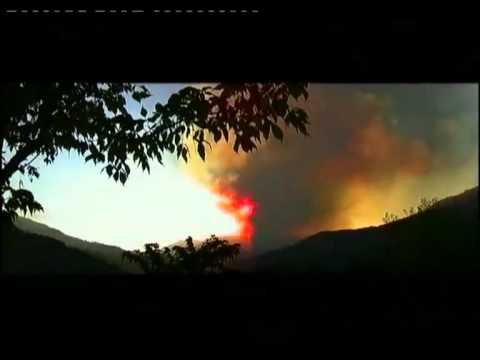
Waldbrände auf Korsika
Die Waldbrandgefahr in Korsika bleibt weiterhin erhöht: In Corse-du-Sud gilt ein striktes Feuerverbot, das bis zum 18. Oktober verlängert wurde. Mehrere Brände – darunter ein Feuer bei Appietto mit rund 80 betroffenen Hektar und ein Zwischenfall, der den Flughafen Calvi beeinträchtigte – unterstreichen die anhaltende Brandgefahr in der gesamten Insel. Die Echtzeit-Lage sehen Sie auf der offiziellen Risikokarte.
CTA (Centre de Traitement de l'Alerte), erreichbar unter der Notrufnummer 18 vom Festnetz und 112 vom Mobiltelefon.
(function () {
var initPhotoSwipeFromDOM = function (gallerySelector) {
var parseThumbnailElements = function (el) {
var thumbElements = el.childNodes,
numNodes = thumbElements.length,
items = [],
el,
childElements,
thumbnailEl,
size,
item;
for (var i = 0; i 0) {
item.msrc = childElements[0].getAttribute(’src‘); // thumbnail url
if (childElements.length > 1) {
item.title = childElements[1].innerHTML; // caption (contents of figure)
}
}
var mediumSrc = el.getAttribute(‚data-med‘);
if (mediumSrc) {
size = el.getAttribute(‚data-med-size‘).split(‚x‘);
// „medium-sized“ image
item.m = {
src: mediumSrc,
w: parseInt(size[0], 10),
h: parseInt(size[1], 10)
};
}
// original image
item.o = {
src: item.src,
w: item.w,
h: item.h
};
items.push(item);
}
return items;
};
// find nearest parent element
var closest = function closest(el, fn) {
return el && (fn(el) ? el : closest(el.parentNode, fn));
};
var onThumbnailsClick = function (e) {
e = e || window.event;
e.preventDefault ? e.preventDefault() : e.returnValue = false;
var eTarget = e.target || e.srcElement;
var clickedListItem = closest(eTarget, function (el) {
return el.tagName === ‚A‘;
});
if (!clickedListItem) {
return;
}
var clickedGallery = clickedListItem.parentNode;
var childNodes = clickedListItem.parentNode.childNodes,
numChildNodes = childNodes.length,
nodeIndex = 0,
index;
for (var i = 0; i = 0) {
openPhotoSwipe(index, clickedGallery);
}
return false;
};
var photoswipeParseHash = function () {
var hash = window.location.hash.substring(1),
params = {};
if (hash.length < 5) { // pid=1
return params;
}
var vars = hash.split('&');
for (var i = 0; i < vars.length; i++) {
if (!vars[i]) {
continue;
}
var pair = vars[i].split('=');
if (pair.length getThumbBoundsFn section of docs for more info
var thumbnail = items[index].el.children[0],
pageYScroll = window.pageYOffset || document.documentElement.scrollTop,
rect = thumbnail.getBoundingClientRect();
return {x: rect.left, y: rect.top + pageYScroll, w: rect.width};
},
addCaptionHTMLFn: function (item, captionEl, isFake) {
if (!item.title) {
captionEl.children[0].innerText = “;
return false;
}
captionEl.children[0].innerHTML = item.title + ‚© ‚ + item.author + ‚‚;
return true;
}
};
var radios = document.getElementsByName(‚gallery-style‘);
for (var i = 0, length = radios.length; i = 1200 || (!gallery.likelyTouchDevice && realViewportWidth > 800) || screen.width > 1200) {
if (!useLargeImages) {
useLargeImages = true;
imageSrcWillChange = true;
}
} else {
if (useLargeImages) {
useLargeImages = false;
imageSrcWillChange = true;
}
}
if (imageSrcWillChange && !firstResize) {
gallery.invalidateCurrItems();
}
if (firstResize) {
firstResize = false;
}
imageSrcWillChange = false;
});
gallery.listen(‚gettingData‘, function (index, item) {
console.log(item);
if (useLargeImages) {
item.src = item.o.src;
item.w = item.o.w;
item.h = item.o.h;
} else {
item.src = item.m.src;
item.w = item.m.w;
item.h = item.m.h;
}
});
gallery.init();
};
// select all gallery elements
var galleryElements = document.querySelectorAll(gallerySelector);
for (var i = 0, l = galleryElements.length; i 0 && hashData.gid > 0) {
openPhotoSwipe(hashData.pid – 1, galleryElements[ hashData.gid – 1 ], true);
}
};
initPhotoSwipeFromDOM(‚.demo-gallery‘);
})();
$(document).ready(function () {
$(„.category_foto_show a[rel^=’prettyPhoto‘]“).prettyPhoto({social_tools: false, animation_speed: ’normal‘, theme: ‚light_square‘, slideshow: 3000, autoplay_slideshow: true});
$(„.boxcontent_img a[rel^=’prettyPhoto‘]“).prettyPhoto({social_tools: false});
});
jQuery(document).ready(function ($) {
var _SlideshowTransitions = [
//Fade Fly in R
{$Duration: 1200, $During: { $Left: [0.3, 0.7] }, $FlyDirection: 2, $Easing: { $Left: $JssorEasing$.$EaseInCubic, $Opacity: $JssorEasing$.$EaseLinear }, $ScaleHorizontal: 0.3, $Opacity: 2, $Outside: true }
//Fade Fly out L
, { $Duration: 1200, $SlideOut: true, $FlyDirection: 1, $Easing: { $Left: $JssorEasing$.$EaseInCubic, $Opacity: $JssorEasing$.$EaseLinear }, $ScaleHorizontal: 0.3, $Opacity: 2, $Outside: true }
];
var _CaptionTransitions = [];
_CaptionTransitions[„L“] = { $Duration: 800, $FlyDirection: 1, $Easing: $JssorEasing$.$EaseInCubic };
_CaptionTransitions[„R“] = { $Duration: 800, $FlyDirection: 2, $Easing: $JssorEasing$.$EaseInCubic };
_CaptionTransitions[„T“] = { $Duration: 800, $FlyDirection: 4, $Easing: $JssorEasing$.$EaseInCubic };
_CaptionTransitions[„B“] = { $Duration: 800, $FlyDirection: 8, $Easing: $JssorEasing$.$EaseInCubic };
_CaptionTransitions[„TL“] = { $Duration: 800, $FlyDirection: 5, $Easing: $JssorEasing$.$EaseInCubic };
_CaptionTransitions[„TR“] = { $Duration: 800, $FlyDirection: 6, $Easing: $JssorEasing$.$EaseInCubic };
_CaptionTransitions[„BL“] = { $Duration: 800, $FlyDirection: 9, $Easing: $JssorEasing$.$EaseInCubic };
_CaptionTransitions[„BR“] = { $Duration: 800, $FlyDirection: 10, $Easing: $JssorEasing$.$EaseInCubic };
_CaptionTransitions[„CLIP|LR“] = { $Duration: 10, $Clip: 3, $Easing: $JssorEasing$.$EaseInOutCubic };
_CaptionTransitions[„MCLIP|L“] = { $Duration: 10, $Clip: 1, $Move: true, $Easing: $JssorEasing$.$EaseInOutCubic };
_CaptionTransitions[„LISTH|L“] = { $Duration: 1000, $Clip: 1, $FlyDirection: 1, $Easing: $JssorEasing$.$EaseInOutCubic, $ScaleHorizontal: 0.8, $ScaleClip: 0.8, $During: { $Left: [0.4, 0.6], $Clip: [0, 0.4]} };
_CaptionTransitions[„WAVE|L“] = { $Duration: 1300, $FlyDirection: 5, $Easing: { $Left: $JssorEasing$.$EaseLinear, $Top: $JssorEasing$.$EaseInWave }, $ScaleVertical: 0.3, $Round: { $Top: 2.5} };
_CaptionTransitions[„JUMPDN|R“] = { $Duration: 1000, $FlyDirection: 6, $Easing: { $Left: $JssorEasing$.$EaseLinear, $Top: $JssorEasing$.$EaseOutJump }, $ScaleHorizontal: 0.6, $ScaleVertical: 0.4, $Round: { $Top: 1.5} };
_CaptionTransitions[„DDG|TR“] = { $Duration: 1200, $Clip: 15, $FlyDirection: 6, $Easing: { $Left: $JssorEasing$.$EaseInJump, $Top: $JssorEasing$.$EaseInJump, $Clip: $JssorEasing$.$EaseSwing }, $ScaleHorizontal: 0.3, $ScaleVertical: 0.3, $During: { $Left: [0, 0.8], $Top: [0, 0.8] }, $Round: { $Left: 0.8, $Top: 0.8} };
_CaptionTransitions[„DODGEDANCE|L“] = { $Duration: 1200, $Clip: 15, $FlyDirection: 9, $Easing: { $Left: $JssorEasing$.$EaseInJump, $Top: $JssorEasing$.$EaseInJump, $Clip: $JssorEasing$.$EaseOutQuad }, $ScaleHorizontal: 0.3, $ScaleVertical: 0.3, $During: { $Left: [0, 0.8], $Top: [0, 0.8] }, $Round: { $Left: 0.8, $Top: 2.5} };
_CaptionTransitions[„FLUTTER|L“] = { $Duration: 600, $FlyDirection: 9, $Easing: { $Left: $JssorEasing$.$EaseLinear, $Top: $JssorEasing$.$EaseOutWave, $Opacity: $JssorEasing$.$EaseLinear }, $ScaleHorizontal: 0.2, $ScaleVertical: 0.1, $Opacity: 2, $Round: { $Top: 1.3} };
_CaptionTransitions[„TORTUOUS|VB“] = { $Duration: 1200, $Clip: 15, $FlyDirection: 8, $Easing: { $Top: $JssorEasing$.$EaseOutWave, $Clip: $JssorEasing$.$EaseOutCubic }, $ScaleVertical: 0.2, $During: { $Top: [0, 0.7] }, $Round: { $Top: 1.3} };
_CaptionTransitions[„FADE“] = { $Duration: 600, $Opacity: 2 };
_CaptionTransitions[„ZMF|10“] = { $Duration: 600, $Zoom: 11, $Easing: { $Zoom: $JssorEasing$.$EaseInExpo, $Opacity: $JssorEasing$.$EaseLinear }, $Opacity: 2 };
_CaptionTransitions[„RTT|10“] = { $Duration: 600, $Zoom: 11, $Rotate: true, $Easing: { $Zoom: $JssorEasing$.$EaseInExpo, $Opacity: $JssorEasing$.$EaseLinear, $Rotate: $JssorEasing$.$EaseInExpo }, $Opacity: 2, $Round: { $Rotate: 0.8} };
_CaptionTransitions[„RTTL|BR“] = { $Duration: 600, $Zoom: 11, $Rotate: true, $FlyDirection: 10, $Easing: { $Left: $JssorEasing$.$EaseInExpo, $Top: $JssorEasing$.$EaseInExpo, $Zoom: $JssorEasing$.$EaseInExpo, $Opacity: $JssorEasing$.$EaseLinear, $Rotate: $JssorEasing$.$EaseInExpo }, $ScaleHorizontal: 0.6, $ScaleVertical: 0.6, $Opacity: 2, $Round: { $Rotate: 0.8} };
var options = {
$AutoPlay: true, //[Optional] Whether to auto play, to enable slideshow, this option must be set to true, default value is false
$AutoPlaySteps: 1, //[Optional] Steps to go for each navigation request (this options applys only when slideshow disabled), the default value is 1
$AutoPlayInterval: 4000, //[Optional] Interval (in milliseconds) to go for next slide since the previous stopped if the slider is auto playing, default value is 3000
$PauseOnHover: 1, //[Optional] Whether to pause when mouse over if a slider is auto playing, 0 no pause, 1 pause for desktop, 2 pause for touch device, 3 pause for desktop and touch device, default value is 1
$ArrowKeyNavigation: true, //[Optional] Allows keyboard (arrow key) navigation or not, default value is false
$SlideDuration: 500, //[Optional] Specifies default duration (swipe) for slide in milliseconds, default value is 500
$MinDragOffsetToSlide: 20, //[Optional] Minimum drag offset to trigger slide , default value is 20
$SlideSpacing: 0, //[Optional] Space between each slide in pixels, default value is 0
$DisplayPieces: 1, //[Optional] Number of pieces to display (the slideshow would be disabled if the value is set to greater than 1), the default value is 1
$ParkingPosition: 0, //[Optional] The offset position to park slide (this options applys only when slideshow disabled), default value is 0.
$UISearchMode: 1, //[Optional] The way (0 parellel, 1 recursive, default value is 1) to search UI components (slides container, loading screen, navigator container, arrow navigator container, thumbnail navigator container etc).
$PlayOrientation: 1, //[Optional] Orientation to play slide (for auto play, navigation), 1 horizental, 2 vertical, default value is 1
$DragOrientation: 3, //[Optional] Orientation to drag slide, 0 no drag, 1 horizental, 2 vertical, 3 either, default value is 1 (Note that the $DragOrientation should be the same as $PlayOrientation when $DisplayPieces is greater than 1, or parking position is not 0)
$SlideshowOptions: { //[Optional] Options to specify and enable slideshow or not
$Class: $JssorSlideshowRunner$, //[Required] Class to create instance of slideshow
$Transitions: _SlideshowTransitions, //[Required] An array of slideshow transitions to play slideshow
$TransitionsOrder: 1, //[Optional] The way to choose transition to play slide, 1 Sequence, 0 Random
$ShowLink: true //[Optional] Whether to bring slide link on top of the slider when slideshow is running, default value is false
},
$CaptionSliderOptions: { //[Optional] Options which specifies how to animate caption
$Class: $JssorCaptionSlider$, //[Required] Class to create instance to animate caption
$CaptionTransitions: _CaptionTransitions, //[Required] An array of caption transitions to play caption, see caption transition section at jssor slideshow transition builder
$PlayInMode: 1, //[Optional] 0 None (no play), 1 Chain (goes after main slide), 3 Chain Flatten (goes after main slide and flatten all caption animations), default value is 1
$PlayOutMode: 3 //[Optional] 0 None (no play), 1 Chain (goes before main slide), 3 Chain Flatten (goes before main slide and flatten all caption animations), default value is 1
},
$BulletNavigatorOptions: { //[Optional] Options to specify and enable navigator or not
$Class: $JssorBulletNavigator$, //[Required] Class to create navigator instance
$ChanceToShow: 1, //[Required] 0 Never, 1 Mouse Over, 2 Always
$ActionMode: 3, //[Optional] 0 None, 1 act by click, 2 act by mouse hover, 3 both, default value is 1
$Lanes: 2, //[Optional] Specify lanes to arrange items, default value is 1
$SpacingX: 10, //[Optional] Horizontal space between each item in pixel, default value is 0
$SpacingY: 10 //[Optional] Vertical space between each item in pixel, default value is 0
},
$ArrowNavigatorOptions: {
$Class: $JssorArrowNavigator$, //[Requried] Class to create arrow navigator instance
$ChanceToShow: 1 //[Required] 0 Never, 1 Mouse Over, 2 Always
},
$ThumbnailNavigatorOptions: {
$Class: $JssorThumbnailNavigator$, //[Required] Class to create thumbnail navigator instance
$ChanceToShow: 2, //[Required] 0 Never, 1 Mouse Over, 2 Always
$ActionMode: 0, //[Optional] 0 None, 1 act by click, 2 act by mouse hover, 3 both, default value is 1
$DisableDrag: true, //[Optional] Disable drag or not, default value is false
$Orientation: 2 //[Optional] Orientation to arrange thumbnails, 1 horizental, 2 vertical, default value is 1
}
};
var jssor_slider1 = new $JssorSlider$(„slider1_container“, options);
/* modifiche *********************************************** */
var startWidth = document.getElementById(‚CategoryBoxes‘).offsetWidth;
var startHeight = document.getElementById(‚CategoryBoxes‘).offsetHeight;
/* ********************************************************* */
function ScaleSlider() {
var parentWidth = parseInt(document.getElementById(‚CategoryBoxes‘).offsetWidth-20);
if ((parentWidth>309) && (startWidth<330))
parentWidth=250;
if (parentWidth)
jssor_slider1.$SetScaleWidth(Math.min(parentWidth, 310));
else
window.setTimeout(ScaleSlider, 30);
}
ScaleSlider();
if (!navigator.userAgent.match(/(iPhone|iPod|iPad|BlackBerry|IEMobile)/)) {
startWidth = document.getElementById('CategoryBoxes').offsetWidth;
$(window).bind('resize', ScaleSlider);
}
$(window).bind( 'resize', function(e){
var ori = window.orientation,
//width = (ori==90 || ori==-90) ? screen.height : screen.width;
width = (ori==90 || ori==-90) ? $(window).height() : $(window).width();
startWidth = width;
ScaleSlider();
});
$(window).bind( 'orientationchange', function(e){
var ori = window.orientation,
width = (ori==90 || ori==-90) ? screen.height : screen.width;
startWidth = width;
ScaleSlider();
});
if (!navigator.userAgent.match(/(iPhone|iPod|iPad|BlackBerry|IEMobile)/)) {
var ori = window.orientation,
width = (ori==90 || ori==-90) ? screen.height : screen.width;
startWidth = width;
$JssorUtils$.$OnWindowResize(window, ScaleSlider);
}
if (navigator.userAgent.match(/(iPhone|iPod|iPad)/)) {
var ori = window.orientation,
width = (ori==90 || ori==-90) ? screen.height : screen.width;
startWidth = width;
//console.log("startWidth_4:"+startWidth);
//startWidth = document.getElementById('CategoryBoxes').offsetWidth;
$JssorUtils$.$AddEvent(window, "orientationchange", ScaleSlider);
}
//responsive code end
});
// 80)
{
$(this).text($(this).text().substr(0,80)+’…‘);
}
});
});
// ]]>